 4fa80ce74c
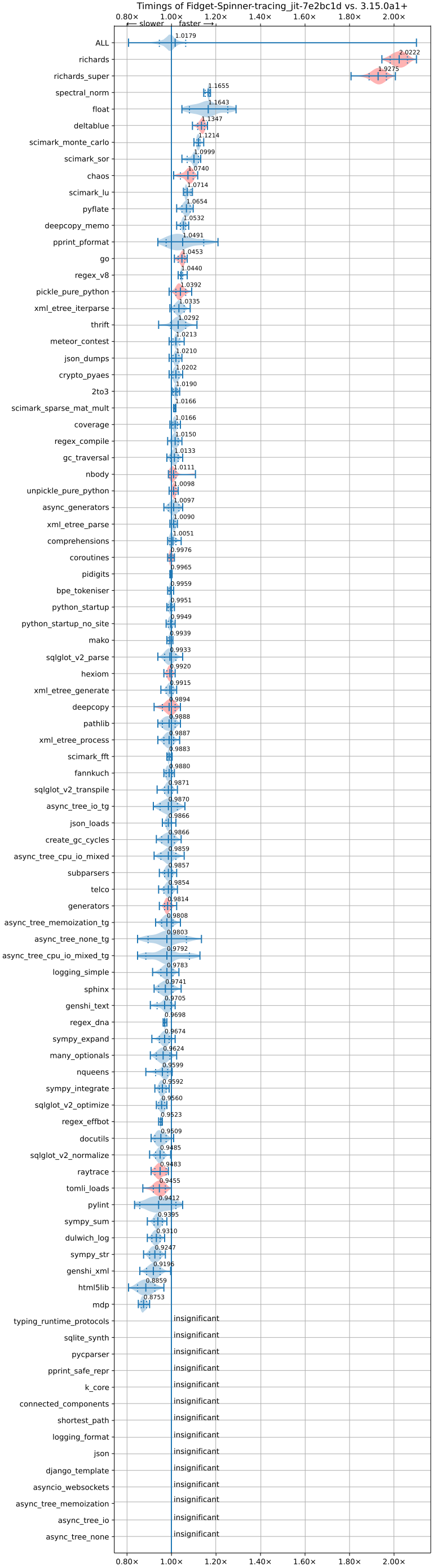
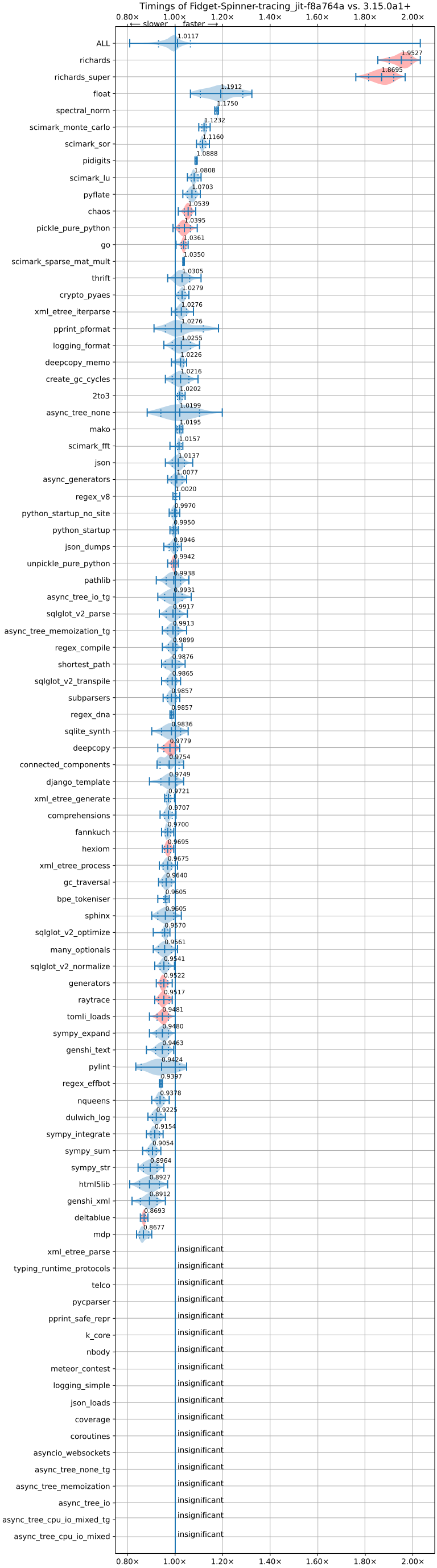
This PR changes the current JIT model from trace projection to trace recording. Benchmarking: better pyperformance (about 1.7% overall) geomean versus current https://raw.githubusercontent.com/facebookexperimental/free-threading-benchmarking/refs/heads/main/results/bm-20251108-3.15.0a1%2B-7e2bc1d-JIT/bm-20251108-vultr-x86_64-Fidget%252dSpinner-tracing_jit-3.15.0a1%2B-7e2bc1d-vs-base.svg, 100% faster Richards on the most improved benchmark versus the current JIT. Slowdown of about 10-15% on the worst benchmark versus the current JIT. **Note: the fastest version isn't the one merged, as it relies on fixing bugs in the specializing interpreter, which is left to another PR**. The speedup in the merged version is about 1.1%. https://raw.githubusercontent.com/facebookexperimental/free-threading-benchmarking/refs/heads/main/results/bm-20251112-3.15.0a1%2B-f8a764a-JIT/bm-20251112-vultr-x86_64-Fidget%252dSpinner-tracing_jit-3.15.0a1%2B-f8a764a-vs-base.svg

Stats: 50% more uops executed, 30% more traces entered the last time we ran them. It also suggests our trace lengths for a real trace recording JIT are too short, as a lot of trace too long aborts https://github.com/facebookexperimental/free-threading-benchmarking/blob/main/results/bm-20251023-3.15.0a1%2B-eb73378-CLANG%2CJIT/bm-20251023-vultr-x86_64-Fidget%252dSpinner-tracing_jit-3.15.0a1%2B-eb73378-pystats-vs-base.md .

This new JIT frontend is already able to record/execute significantly more instructions than the previous JIT frontend. In this PR, we are now able to record through custom dunders, simple object creation, generators, etc. None of these were done by the old JIT frontend. Some custom dunders uops were discovered to be broken as part of this work gh-140277

The optimizer stack space check is disabled, as it's no longer valid to deal with underflow.

Pros:
* Ignoring the generated tracer code as it's automatically created, this is only additional 1k lines of code. The maintenance burden is handled by the DSL and code generator.
* `optimizer.c` is now significantly simpler, as we don't have to do strange things to recover the bytecode from a trace.
* The new JIT frontend is able to handle a lot more control-flow than the old one.
* Tracing is very low overhead. We use the tail calling interpreter/computed goto interpreter to switch between tracing mode and non-tracing mode. I call this mechanism dual dispatch, as we have two dispatch tables dispatching to each other. Specialization is still enabled while tracing.
* Better handling of polymorphism. We leverage the specializing interpreter for this.

Cons:
* (For now) requires tail calling interpreter or computed gotos. This means no Windows JIT for now :(. Not to fret, tail calling is coming soon to Windows though https://github.com/python/cpython/pull/139962

Design:
* After each instruction, the `record_previous_inst` function/label is executed. This does as the name suggests.
* The tracing interpreter lowers bytecode to uops directly so that it can obtain "fresh" values at the point of lowering.
* The tracing version behaves nearly identical to the normal interpreter, in fact it even has specialization! This allows it to run without much of a slowdown when tracing. The actual cost of tracing is only a function call and writes to memory.
* The tracing interpreter uses the specializing interpreter's deopt to naturally form the side exit chains. This allows it to side exit chain effectively, without repeating much code. We force a re-specializing when tracing a deopt.
* The tracing interpreter can even handle goto errors/exceptions, but I chose to disable them for now as it's not tested.
* Because we do not share interpreter dispatch, there is should be no significant slowdown to the original specializing interpreter on tailcall and computed got with JIT disabled. With JIT enabled, there might be a slowdown in the form of the JIT trying to trace.
* Things that could have dynamic instruction pointer effects are guarded on. The guard deopts to a new instruction --- `_DYNAMIC_EXIT`.
This is Python version 3.15.0 alpha 1
=====================================

.. image:: https://github.com/python/cpython/actions/workflows/build.yml/badge.svg?branch=main&event=push
   :alt: CPython build status on GitHub Actions
   :target: https://github.com/python/cpython/actions

.. image:: https://dev.azure.com/python/cpython/_apis/build/status/Azure%20Pipelines%20CI?branchName=main
   :alt: CPython build status on Azure DevOps
   :target: https://dev.azure.com/python/cpython/_build/latest?definitionId=4&branchName=main

.. image:: https://img.shields.io/badge/discourse-join_chat-brightgreen.svg
   :alt: Python Discourse chat
   :target: https://discuss.python.org/


Copyright © 2001 Python Software Foundation.  All rights reserved.

See the end of this file for further copyright and license information.

.. contents::

General Information
-------------------

- Website: https://www.python.org
- Source code: https://github.com/python/cpython
- Issue tracker: https://github.com/python/cpython/issues
- Documentation: https://docs.python.org
- Developer's Guide: https://devguide.python.org/

Contributing to CPython
-----------------------

For more complete instructions on contributing to CPython development,
see the `Developer Guide`_.

.. _Developer Guide: https://devguide.python.org/

Using Python
------------

Installable Python kits, and information about using Python, are available at
`python.org`_.

.. _python.org: https://www.python.org/

Build Instructions
------------------

On Unix, Linux, BSD, macOS, and Cygwin::

    ./configure
    make
    make test
    sudo make install

This will install Python as ``python3``.

You can pass many options to the configure script; run ``./configure --help``
to find out more.  On macOS case-insensitive file systems and on Cygwin,
the executable is called ``python.exe``; elsewhere it's just ``python``.

Building a complete Python installation requires the use of various
additional third-party libraries, depending on your build platform and
configure options.  Not all standard library modules are buildable or
usable on all platforms.  Refer to the
`Install dependencies <https://devguide.python.org/getting-started/setup-building.html#build-dependencies>`_
section of the `Developer Guide`_ for current detailed information on
dependencies for various Linux distributions and macOS.

On macOS, there are additional configure and build options related
to macOS framework and universal builds.  Refer to `Mac/README.rst
<https://github.com/python/cpython/blob/main/Mac/README.rst>`_.

On Windows, see `PCbuild/readme.txt
<https://github.com/python/cpython/blob/main/PCbuild/readme.txt>`_.

To build Windows installer, see `Tools/msi/README.txt
<https://github.com/python/cpython/blob/main/Tools/msi/README.txt>`_.

If you wish, you can create a subdirectory and invoke configure from there.
For example::

    mkdir debug
    cd debug
    ../configure --with-pydebug
    make
    make test

(This will fail if you *also* built at the top-level directory.  You should do
a ``make clean`` at the top-level first.)

To get an optimized build of Python, ``configure --enable-optimizations``
before you run ``make``.  This sets the default make targets up to enable
Profile Guided Optimization (PGO) and may be used to auto-enable Link Time
Optimization (LTO) on some platforms.  For more details, see the sections
below.

Profile Guided Optimization
^^^^^^^^^^^^^^^^^^^^^^^^^^^

PGO takes advantage of recent versions of the GCC or Clang compilers.  If used,
either via ``configure --enable-optimizations`` or by manually running
``make profile-opt`` regardless of configure flags, the optimized build
process will perform the following steps:

The entire Python directory is cleaned of temporary files that may have
resulted from a previous compilation.

An instrumented version of the interpreter is built, using suitable compiler
flags for each flavor. Note that this is just an intermediary step.  The
binary resulting from this step is not good for real-life workloads as it has
profiling instructions embedded inside.

After the instrumented interpreter is built, the Makefile will run a training
workload.  This is necessary in order to profile the interpreter's execution.
Note also that any output, both stdout and stderr, that may appear at this step
is suppressed.

The final step is to build the actual interpreter, using the information
collected from the instrumented one.  The end result will be a Python binary
that is optimized; suitable for distribution or production installation.


Link Time Optimization
^^^^^^^^^^^^^^^^^^^^^^

Enabled via configure's ``--with-lto`` flag.  LTO takes advantage of the
ability of recent compiler toolchains to optimize across the otherwise
arbitrary ``.o`` file boundary when building final executables or shared
libraries for additional performance gains.


What's New
----------

We have a comprehensive overview of the changes in the `What's new in Python
3.15 <https://docs.python.org/3.15/whatsnew/3.15.html>`_ document.  For a more
detailed change log, read `Misc/NEWS
<https://github.com/python/cpython/tree/main/Misc/NEWS.d>`_, but a full
accounting of changes can only be gleaned from the `commit history
<https://github.com/python/cpython/commits/main>`_.

If you want to install multiple versions of Python, see the section below
entitled "Installing multiple versions".


Documentation
-------------

`Documentation for Python 3.15 <https://docs.python.org/3.15/>`_ is online,
updated daily.

It can also be downloaded in many formats for faster access.  The documentation
is downloadable in HTML, EPUB, and reStructuredText formats; the latter version
is primarily for documentation authors, translators, and people with special
formatting requirements.

For information about building Python's documentation, refer to `Doc/README.rst
<https://github.com/python/cpython/blob/main/Doc/README.rst>`_.


Testing
-------

To test the interpreter, type ``make test`` in the top-level directory.  The
test set produces some output.  You can generally ignore the messages about
skipped tests due to optional features which can't be imported.  If a message
is printed about a failed test or a traceback or core dump is produced,
something is wrong.

By default, tests are prevented from overusing resources like disk space and
memory.  To enable these tests, run ``make buildbottest``.

If any tests fail, you can re-run the failing test(s) in verbose mode.  For
example, if ``test_os`` and ``test_gdb`` failed, you can run::

    make test TESTOPTS="-v test_os test_gdb"

If the failure persists and appears to be a problem with Python rather than
your environment, you can `file a bug report
<https://github.com/python/cpython/issues>`_ and include relevant output from
that command to show the issue.

See `Running & Writing Tests <https://devguide.python.org/testing/run-write-tests.html>`_
for more on running tests.

Installing multiple versions
----------------------------

On Unix and Mac systems if you intend to install multiple versions of Python
using the same installation prefix (``--prefix`` argument to the configure
script) you must take care that your primary python executable is not
overwritten by the installation of a different version.  All files and
directories installed using ``make altinstall`` contain the major and minor
version and can thus live side-by-side.  ``make install`` also creates
``${prefix}/bin/python3`` which refers to ``${prefix}/bin/python3.X``.  If you
intend to install multiple versions using the same prefix you must decide which
version (if any) is your "primary" version.  Install that version using
``make install``.  Install all other versions using ``make altinstall``.

For example, if you want to install Python 2.7, 3.6, and 3.15 with 3.15 being the
primary version, you would execute ``make install`` in your 3.15 build directory
and ``make altinstall`` in the others.


Release Schedule
----------------

See `PEP 790 <https://peps.python.org/pep-0790/>`__ for Python 3.15 release details.


Copyright and License Information
---------------------------------


Copyright © 2001 Python Software Foundation.  All rights reserved.

Copyright © 2000 BeOpen.com.  All rights reserved.

Copyright © 1995-2001 Corporation for National Research Initiatives.  All
rights reserved.

Copyright © 1991-1995 Stichting Mathematisch Centrum.  All rights reserved.

See the `LICENSE <https://github.com/python/cpython/blob/main/LICENSE>`_ for
information on the history of this software, terms & conditions for usage, and a
DISCLAIMER OF ALL WARRANTIES.

This Python distribution contains *no* GNU General Public License (GPL) code,
so it may be used in proprietary projects.  There are interfaces to some GNU
code but these are entirely optional.

All trademarks referenced herein are property of their respective holders.